What does it take to make a WordPress theme?
WordPress isn’t a traditional web server like Apache or NGINX in that it doesn’t serve files as such — it processes everything through PHP, and to do that it thinks in terms of themes. Without an active theme, WordPress won’t render anything at all.
Style.css
So what’s the minimum theme?
A single file: style.css, with a special comment block at the top:
/*
Theme Name: Sandbox Theme
Description: A minimal theme built from scratch
Author: Martin Ashworth
Version: 1.0
*/
That’s enough for WordPress to recognise it as a theme. Drop it in wp-content/themes/sandbox/, and it will appear in the admin panel where you can activate it.
But visit the site and you get nothing — and that’s because there’s nothing actually telling WordPress what to render.
Index.php
This is where index.php comes in. It’s the file WordPress runs when someone hits your site. Include some HTML in here, and WordPress serves your page.
These two files together — style.css for registration, index.php for output — constitute the minimal viable WordPress theme.
Sprinkle in some HTML
So, with our theme activated, let’s start with some HTML – a heading, a few sections, and a footer.
html
<!DOCTYPE html>
<html lang="en">
<head>
<meta charset="UTF-8">
<meta name="viewport" content="width=device-width, initial-scale=1.0">
<title>Sandbox Theme</title>
</head>
<body>
<header>
<nav>
<a href="/">Acme Studio</a>
<a href="#about">About</a>
<a href="#services">Services</a>
<a href="#contact">Contact</a>
</nav>
</header>
<main>
<section id="hero">
<h1>We build things that matter</h1>
<p>A small studio helping small businesses look serious online.</p>
</section>
<section id="about">
<h2>About</h2>
<p>We're a two-person team who believe great websites start with great content. </p>
<p>We listen first, then build. No templates, no fluff — just clear, honest sites that work.</p>
</section>
<section id="services">
<h2>Services</h2>
<ul>
<li>Brochure websites</li>
<li>Content-first design</li>
<li>WordPress setup and handover</li>
</ul>
</section>
<section id="contact">
<h2>Get in touch</h2>
<p>Email us at <a href="mailto:hello@acme.studio">hello@acme.studio</a> or fill in the form below.</p>
</section>
</main>
<footer>
<p>© 2026 Acme Studio</p>
</footer>
</body>
</html>Serve it up
And now let’s see what we get.
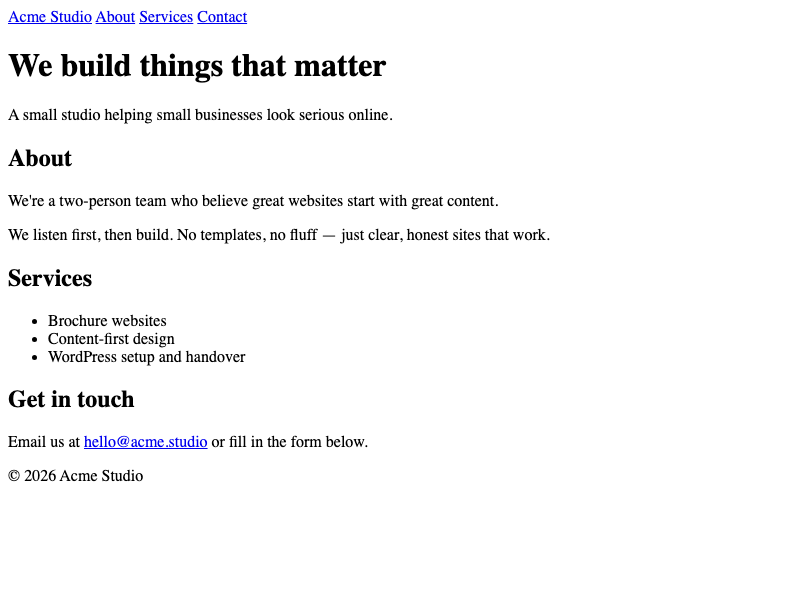
So now we’ve got the beginnings of a working theme — two files, a handful of HTML, and a page being served in the browser.
But why does it look like the 90s? Well, the styling, such as it is — the font, the spacing, the blue links — that’s the browser’s choice, not ours.
To take this styling any further, we’re going to need to start making our own.
Leave a Reply